
Drop a video,
get the words.
A free Mac app that transcribes video and audio files with Apple's on-device speech engine. Drop in a file, get timestamped cues you can edit, then export subtitles for YouTube or plain text. Nothing is uploaded anywhere.
MacFree
Free · Version 1.0.1 · 2.7 MB · Requires macOS 26 or later
Features
Fast, private, and ready for YouTube.
Transcriber uses the same speech engine that powers transcription in Apple's own apps on macOS 26. It runs on your Mac's Neural Engine, so a ten-minute video is done in well under a minute, and your files never leave your computer.
Video or audio
MP4, MOV, M4A, MP3, WAV, AIFF and anything else your Mac can play. Several audio tracks are mixed together before transcription.
Real timestamps
Every word keeps the moment it was spoken, so subtitles land exactly on the speech and stay in sync however you edit them.
Subtitle-sized cues
Text is grouped into cues of two lines up to 42 characters, broken at sentence ends, commas and pauses, the way YouTube and broadcast captions expect. Adjust the limits in Settings.
Edit in place
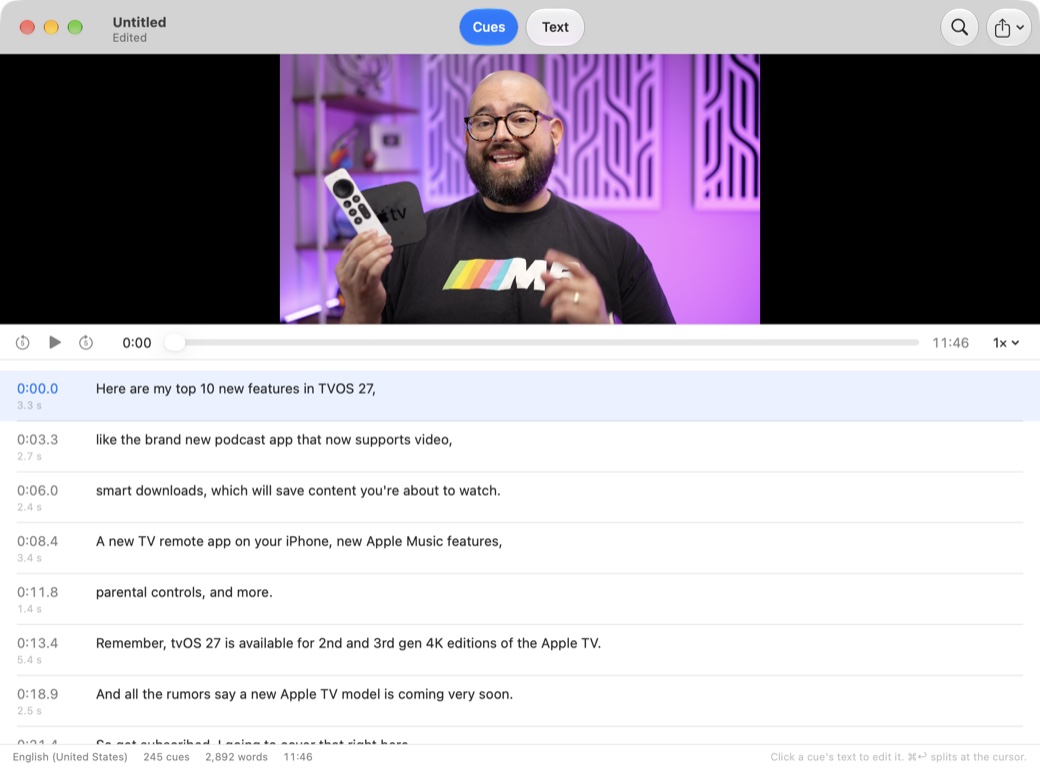
Click any cue to fix a word, split a cue at the cursor, merge two, or retime one. Find & Replace fixes a misheard name everywhere at once, and everything is undoable.
Follows playback
Play the file right in the window. The current cue highlights as it is spoken, and clicking a timestamp jumps the player there, so proofreading is quick.
Export your way
SRT and WebVTT subtitles, plain text as paragraphs, text with a timestamp on each paragraph, or Markdown for show notes and blog posts. Save the project to come back to it later.
How it works
Three steps, all on your Mac.
There is no account and no upload. The first time you transcribe a language, macOS downloads Apple's speech model for it; after that it works offline.
- Drop. Drag a video or audio file onto the window or the Dock icon. Transcription starts immediately and the text streams in as it is recognized.
- Fix. Read along with playback. Click a cue to edit it, split or merge cues, and use Find & Replace for anything the engine heard wrong.
- Export. Choose SRT or WebVTT for YouTube and video editors, plain text with or without timestamps, or Markdown. The file is named after your video and saved next to it.
Install
Installing
Transcriber is distributed directly, not through the App Store. Updates arrive inside the app.
- Download the disk image and drag Transcriber into your Applications folder.
- Open the app. It's signed and notarized with Apple, so macOS opens it without any security warnings.
- Drop a video or audio file on the window. The transcript appears in a few seconds.
FAQ
Questions
Which languages does it support?
Whatever Apple's on-device engine supports on your Mac, which includes English, Spanish, French, German, Italian, Portuguese, Japanese, Korean, Chinese and more. Pick the language in Settings; the model for it downloads once, then works offline.
How accurate is it?
It is the same engine Apple uses for transcription in its own apps on macOS 26, with punctuation and capitalization built in. Clear speech comes out very close to right; names and jargon are where Find & Replace earns its keep.
Does anything get uploaded?
No. Transcription runs on your Mac's Neural Engine. Transcriber has no account, no analytics and no network features apart from checking for its own updates.
Will the SRT work on YouTube?
Yes. Cues are numbered, timed to the millisecond and wrapped to two lines of up to 42 characters, which is what YouTube's caption editor expects. WebVTT is there for players and editors that prefer it.
Can it tell speakers apart?
Not yet. Apple's engine does not label speakers, so the transcript is a single flow of text. Paragraph breaks follow pauses in the speech.
What is a .transcriber file?
Your project: the words with their timings, your edited cues and a link to the media. Open it later to keep editing or to export again in another format.