
Your day,
on the big screen.
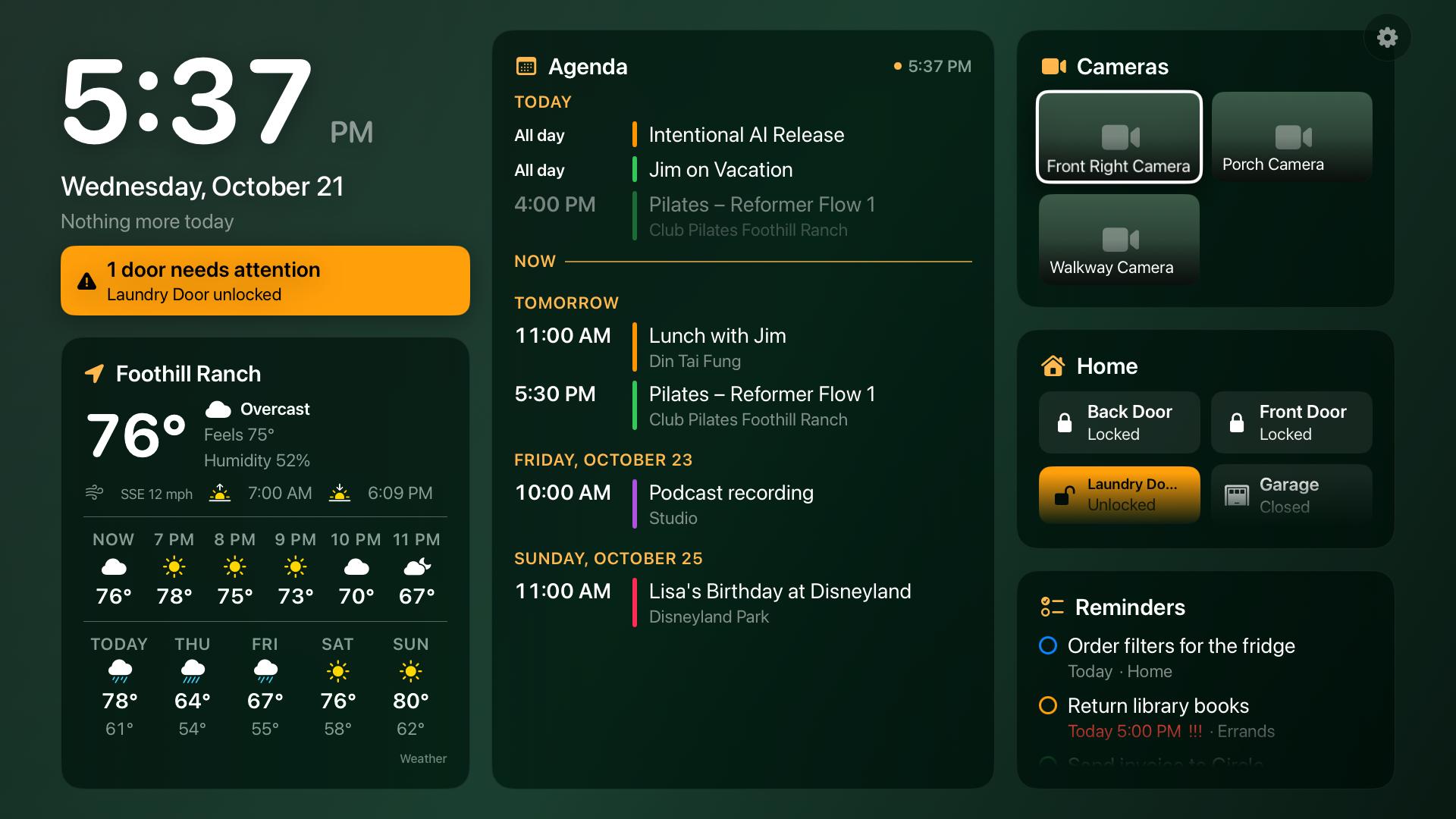
Lookout turns an Apple TV into a glanceable status board: the time, what's next on your calendar, reminders that are due, the weather, and the cameras, locks and sensors from your home. Set it up once from your iPhone.
Apple TViPhoneiPadFree
Free · Apple TV 4K with tvOS 26 or later · iPhone or iPad with iOS 26 or later
Features
Everything you'd glance at, in one place.
Big type, calm glass cards, and only what matters. No themes to decode, no feed to scroll.
Clock and what's next
A large clock, today's date, and a one-line "next up" from your calendar, so you know whether you have time for another coffee.
Agenda
Today, tomorrow and the days ahead from the calendars you pick, in their own colors, with a line marking where "now" is.
Weather
Current conditions, the next six hours and the week ahead from Apple Weather, for the city you set on the Apple TV.
Cameras
Stills from your HomeKit cameras that refresh on their own. Click one with the remote to watch it live, full screen.
Home at a glance
Locks, doors, garage, sensors and temperatures. An unlocked door gets an orange banner under the clock until someone deals with it.
Your wallpaper
Pick a photo on your iPhone or one of the built-in gradients, then dim and blur it until the text reads from the couch.
How it works
Phone chooses, TV shows.
- Install Lookout on your iPhone and allow Calendar and Reminders access. Pick which calendars, lists, panels and cameras the board should show, and choose a wallpaper.
- Open Lookout on your Apple TV signed in to the same iCloud account. Your agenda appears within a minute and stays current as your calendar changes.
- Set the weather location once on the Apple TV. Cameras, locks and sensors come straight from the Home app on the TV itself.
Install
Coming to the App Store.
Lookout is in review. Once it's live this page will link to it. In the meantime, it's available to testers through TestFlight.
FAQ
Common questions
Does it need a server or an account?
No. Your iPhone writes a small snapshot of upcoming events and reminders to your own iCloud account, and the Apple TV reads it from there. Lookout has no servers and no accounts of its own.
Why does the Apple TV read HomeKit directly?
Live camera streams and lock states can only be shown by the device that is asking HomeKit for them. The Apple TV is usually your home hub anyway, so it talks to your accessories itself. The iPhone app only chooses which ones appear.
Can I hide panels?
Yes. On the iPhone, every panel except the clock and the agenda can be switched off, the home-alert banner has its own switch, and the right-hand column can be reordered.
Does it keep the TV awake?
While Lookout is on screen the Apple TV will not go to sleep, which is what you want from a wall display. Press the TV button on the remote to leave.
Which Apple TVs work?
Any Apple TV running tvOS 26 or later. The iPhone app needs iOS 26 or later and also runs on iPad.