
Your Shortcuts,
finally organized.
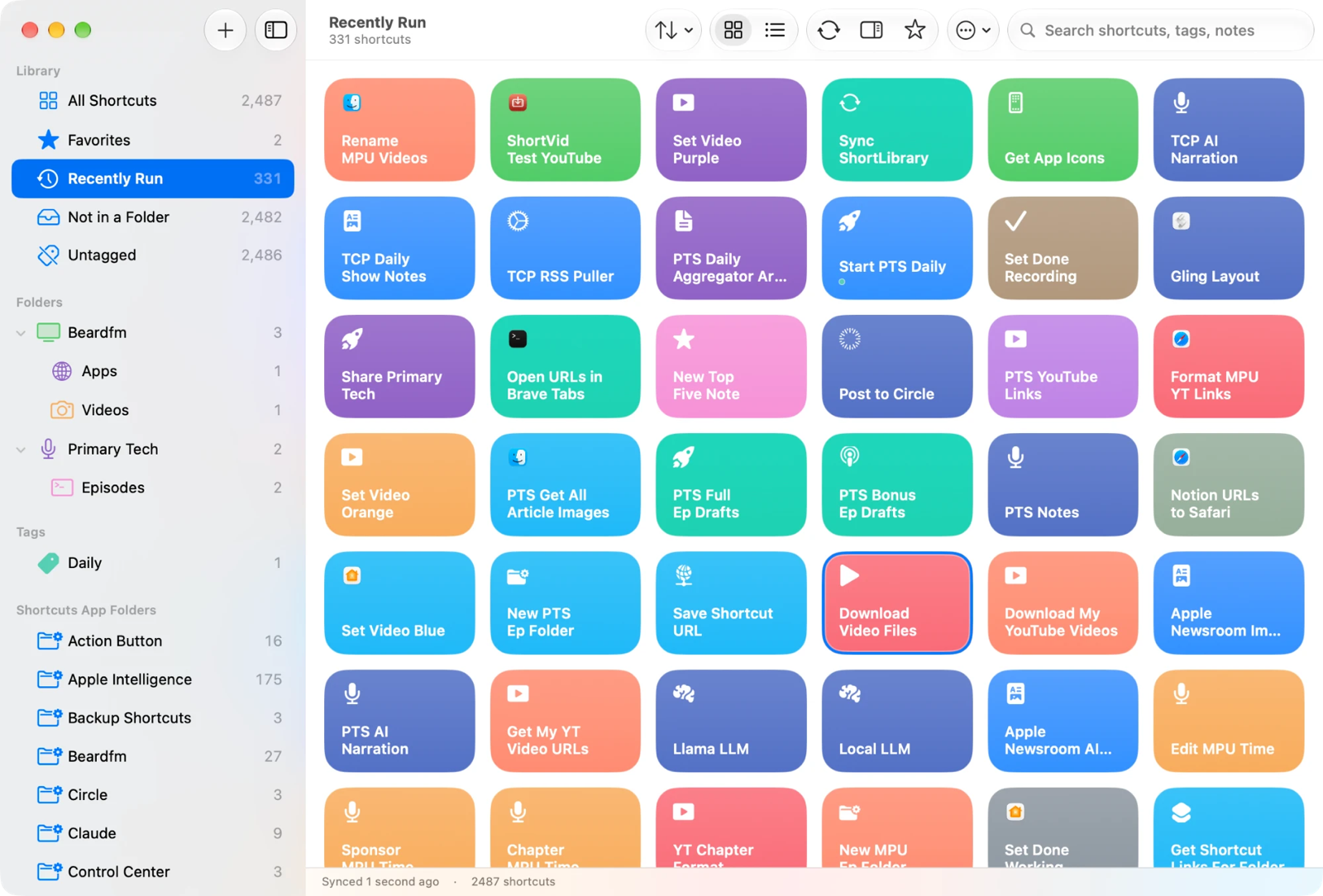
A better front end for the Shortcuts library you already have. ShortLibrary reads your shortcuts straight from the Shortcuts app and shows them as the same colored tiles, then adds what Shortcuts never did: folders inside folders, tags inside tags, favorites, smart lists, search and real sorting. Run anything with a double-click.
MacFreeOpen source
Free · Version 1.0 · 2.2 MB · Requires macOS 27 or later
Features
Everything Shortcuts has, plus the organization it's missing.
Shortcuts gives you one level of folders and a search box. ShortLibrary sits beside it, reads the same library, and lets you arrange it however your head works. Nothing you do in ShortLibrary changes a single shortcut.
Nested folders and tags
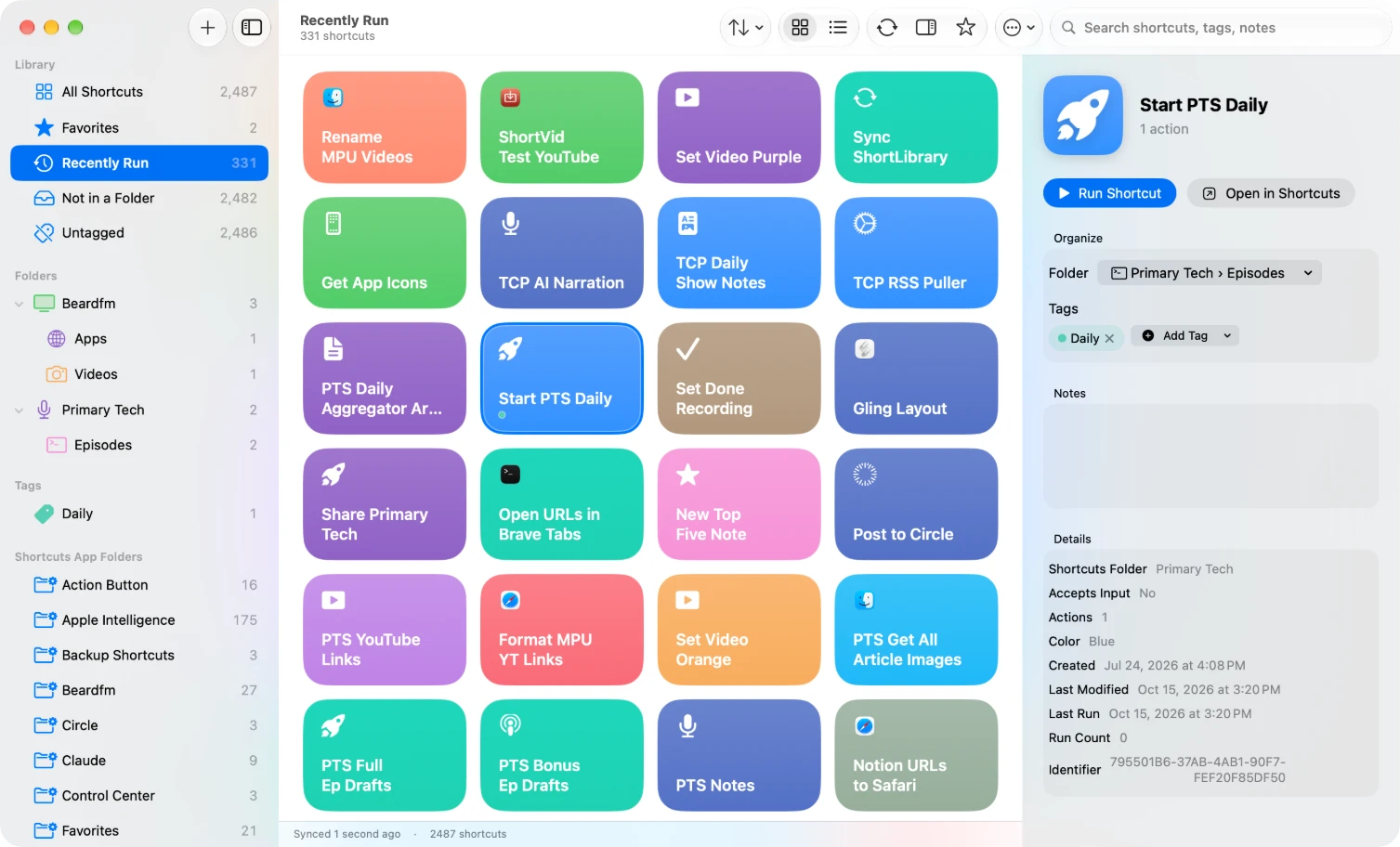
Make a folder, put folders inside it, and keep going; a parent shows everything beneath it. Tags work the same way: give a shortcut as many as you like, nest "Editing" and "Publishing" under "Podcast", and each tag gets its own color and a dot on the tile. Drag tiles onto a folder or tag in the sidebar, or use the context menu. Shortcuts' own folders stay put and show up too.
Favorites and smart lists
Star the shortcuts you reach for. Build smart lists from rules: name, folder, tag, color, action count, accepts input, date added, last modified, last run, run count. Match all or any. They update themselves.
Sort and search
Sort by Shortcuts' own order, name, date added, last modified, last run, action count or run count, ascending or descending. Search covers names, tags and the notes you add to a shortcut.
Run from the grid
Double-click a tile, press ⌘↩, or use the play button that appears on hover. Shortcuts run in the background on the Mac without switching apps, and shortcuts that take input get a field for it. Results and errors show in a banner.
Syncs through your iCloud
Folders, tags, favorites, notes and smart lists live in your private iCloud database, so a second Mac signed into the same account sees the same organization. Nothing is sent to us.
Nothing to rebuild
There's no import and no duplicate library to maintain. Sync again whenever you add or rename shortcuts and ShortLibrary catches up. Shortcuts that disappear are flagged, never silently deleted.
How it works
It asks the Shortcuts app, then stays out of its way.
The Mac is the reference. ShortLibrary reads your library through the Shortcuts app's own scripting interface, inside the App Sandbox, so there is nothing to export and nothing leaves your Mac. Your organization is a layer on top: ShortLibrary never writes to Shortcuts.
- Sync. On launch, and whenever you ask, ShortLibrary reads every shortcut's name, folder, color, icon and action count from Shortcuts. A library of 2,500 shortcuts takes under a second.
- Organize. Folders, tags, favorites, notes and smart lists are stored in a database of ShortLibrary's own and mirrored to your private iCloud. Shortcuts never sees them.
- Run. Running a tile tells Shortcuts to run that shortcut in the background and reports the result.
Install
Installing
ShortLibrary is distributed directly, not through the App Store. Updates arrive inside the app.
- Download the disk image and drag ShortLibrary into your Applications folder.
- Open the app. It's signed and notarized with Apple. The first sync asks for permission to control Shortcuts Events; click Allow.
- Optional, for app icons and real dates: choose File › Link Shortcuts Database for App Icons… and grant access to the Shortcuts folder it suggests. ShortLibrary reads it and never writes to it.
FAQ
Questions
Does it change anything in the Shortcuts app?
No. ShortLibrary only reads from Shortcuts and asks it to run things. Your folders, tags, favorites, notes and smart lists exist only in ShortLibrary. Delete the app and Shortcuts is exactly as it was.
Why does it ask to control Shortcuts Events?
That's the background half of the Shortcuts app that macOS exposes for automation. It's how ShortLibrary lists your shortcuts and runs them without bringing Shortcuts to the front. The permission is the standard macOS Automation prompt and can be changed in System Settings › Privacy & Security › Automation.
Why link the Shortcuts folder?
Shortcuts only tells other apps about a shortcut's glyph, not the app it belongs to. The association that makes Shortcuts show a Safari or Reminders icon lives in its own database. If you grant read access to that folder, ShortLibrary shows the same app icons and uses Shortcuts' real creation, modification and last-run dates. It's optional and read-only.
Can I run shortcuts from it?
Yes. Double-click a tile, press ⌘↩ with one selected, use the play button that appears on hover, or the Run button in the details pane. Shortcuts that accept input get a text field.
Is there an iPhone or iPad version?
Not as a download yet. ShortLibrary is a Mac app. The source on GitHub includes an early iPhone and iPad companion that shares the same iCloud organization, for anyone who wants to build it themselves.
Where is my data stored?
In a database inside the app's sandbox on your Mac, mirrored to the private database of your iCloud account. Nothing is sent to us. There's no account, no analytics and no tracking.
What's the hover play button, and the star?
Hovering a tile shows a play button to run it. The star in the toolbar favorites the selected shortcut, and the details pane (the trailing-sidebar button) holds folder, tags, notes and details for whatever is selected.
Is it open source?
Yes. The whole app is MIT-licensed on GitHub, including the helper shortcut's source and the release script. Issues and pull requests are welcome.