
Download any video,
inside Shortcuts.
A free Mac app with one job: a Download Video action for Shortcuts. Hand it a link and it hands back the video file, ready for Save File, Share, Quick Look or Save to Photos. It works with YouTube, Vimeo, TikTok, Instagram, X and the hundreds of sites yt-dlp supports, as well as direct links to media files.
MacShortcutsFreeOpen source
Free · Version 1.0.6 · 135 MB · Requires macOS 27 or later and an Apple silicon Mac
Features
One action, a lot of sites.
ShortVid is the missing download step for your video shortcuts. There is no window to click through and nothing to copy and paste: the action takes a URL, does the work in the background, and the file flows into whatever comes next.
A real Shortcuts action
Download Video shows up in the Shortcuts action library like any built-in action. Give it a URL from a variable, the Share Sheet or the clipboard, and it returns a File that any other action can use.
Hundreds of sites
Extraction is done by yt-dlp, bundled inside the app, so anything it supports works here: YouTube and Shorts, Vimeo, TikTok, Instagram, X, Reddit, Twitch clips, podcast feeds and plain links to MP4 or WebM files.
Pick the quality
Highest quality takes the best streams the site offers that play as an MP4 without re-encoding: on an M3 or later Mac that includes YouTube's 4K AV1. 4K goes for the largest picture up to 2160p no matter what and converts it when it has to. 1080p, 720p and 480p cap the resolution for smaller files, which is handy when the video is going straight into Messages or a slide. Audio only skips the picture and hands back an M4A, for podcasts, talks and music.
MP4 that just plays
Force MP4 is on by default, so you get a file that QuickTime, Photos and iMovie open without a plug-in. Video your Mac already plays (H.264, HEVC, and AV1 on M3 and later) is repackaged in seconds; VP9 and anything else is converted to H.264 with the bundled ffmpeg and the Mac's hardware encoder. Turn on Compatible MP4 to get H.264 every time, for files headed to older devices.
Updates itself
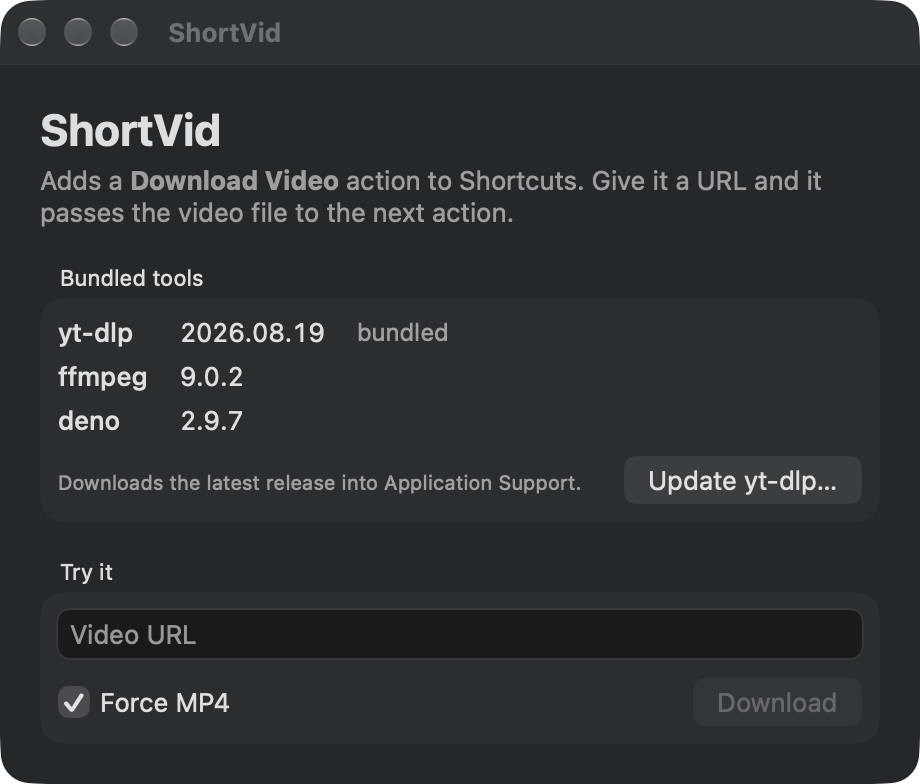
Sites change and yt-dlp changes with them. Choose Update yt-dlp… in the app and it fetches the latest official release, checks that it runs, and uses it from then on. No rebuild, no Terminal.
Nothing in the middle
Downloads go from the site to your Mac. There is no account, no server of ours, no analytics, and the only network requests are the ones you ask for, plus GitHub when you update yt-dlp.
How it works
Three tools in one app.
ShortVid bundles yt-dlp for extraction, ffmpeg for merging and conversion, and Deno, the JavaScript runtime yt-dlp needs for YouTube. They're signed and notarized along with the app, so there is nothing else to install and nothing to keep in a PATH.
- Add the action. In Shortcuts, search for Download Video and drop it into a shortcut. Point its URL at a Share Sheet input, a variable or an Ask Each Time prompt.
- Choose the options. Leave Quality on Highest or cap it, and leave Force MP4 on unless you want the site's native file.
- Use the file. The action's output is a File. Save it, share it, send it to Photos, or pass it to Transcriber or Captioner. The copy ShortVid keeps in its cache is swept after a day.
Install
Installing
ShortVid is distributed directly, not through the App Store, which doesn't allow apps that download from video sites.
- Download the disk image and drag ShortVid into your Applications folder.
- Open the app once. It's signed and notarized with Apple, so macOS opens it without any security warnings, and that first launch is what registers the action with Shortcuts.
- Open Shortcuts and add Download Video to a shortcut. The app doesn't need to stay open; Shortcuts launches it in the background when the action runs.
FAQ
Questions
Which sites work?
Any site yt-dlp supports, which is well over a thousand: YouTube, Vimeo, TikTok, Instagram, X, Reddit, Twitch, Dailymotion, SoundCloud and many more, plus direct links to media files. Private or paywalled videos that need a login are not supported.
Where does the file go?
Wherever the next action in your shortcut puts it. ShortVid stages the download in its own cache folder, hands the file to Shortcuts, and clears files older than a day. Add a Save File action to keep it somewhere permanent.
What does Force MP4 actually do?
It makes sure the result is an H.264 or HEVC video with AAC audio in an MP4 container, which is what QuickTime, Photos and most apps expect. When the site already offers that, the streams are simply merged. When it only offers VP9 or AV1, ffmpeg converts the video using the Mac's hardware encoder. Turn it off to get the site's best quality in its native format, which might be WebM or MKV.
How do the quality options choose a stream?
They cap the frame height: 1080p picks the best streams up to 1080 pixels tall, and so on. If a site only offers larger streams, ShortVid takes the best available rather than failing. Vertical videos are measured by height too, so a 1080×1920 Short counts as 1920.
A download stopped working. Now what?
Usually a site changed something and yt-dlp has already fixed it. Open ShortVid and choose Update yt-dlp… from the ShortVid menu; it downloads the latest release and verifies it before using it. The app shows which copy is active, bundled or updated.
Why isn't it on the App Store?
App Review doesn't allow apps that download from YouTube and similar sites, and ShortVid needs to run bundled command-line tools, which the App Store sandbox forbids. So it's a direct download, signed and notarized with Apple like any other Mac app.
Is it open source?
Yes. The whole app is MIT-licensed on GitHub, including the scripts that fetch and sign the bundled tools and build the release. yt-dlp, ffmpeg and Deno keep their own licenses. Issues and pull requests are welcome.
Does it run on Intel Macs?
Not yet. The bundled tools are Apple silicon builds, so ShortVid needs an M-series Mac and macOS 27 or later.
Your shortcuts, now with video.
Free, open source, notarized by Apple, and ready in one action.
Download for Mac